B&R Enclosures Products
All Products
Please use the search and orange filter buttons below to find the products you are interested in.
-
 Shelving mounts suitable to 19'' racks and cabinets
 -
The MIX range of wall or door mounted air-air heat exchangers have been designed to cool electrical enclosures using ambient air.
-
A range of roof mounted air-water heat exchangers designed to cool electrical enclosures using a chilled water source.
-
A range of products to support management of data centre cooling efficiency.
-
The WID range of anticondensation heaters are suitable for installation in all enclosures, designed to protect equipment from water damage due to condensation.
-
The Ausrack Plus Network and Server cabinets are enhanced with the addition of vertical and horizontal cable management solutions.
-
A range of products to support management of a data centre.
-
A 19" cabinet system designed to protect sensitive network equipment from harsh environments where equipment may be exposed to dust or water.
-
An IP66, 19 inch cabinet system designed to protect sensitive network equipment from harsh environments where equipment is exposed to dust or water.
-
A 2-post frame designed to provide a functional and cost effective solution where accessibility is a major requirement.
-
A 19 inch server rack frame that can be configured into suites & clad as per application requirements. The server rack features allow cable access across the front and rear of the rack.
-
A 19 inch network cabinet combining versatility & strength with easy-to-use features. Accommodates medium to large passive patching networks & active communications equipment.
-
Designed as a purpose built 19" server cabinet. The Ausrack Plus Server features well thought out mounting options and excellent cross flow ventilation.
-
A rack with 4 corner posts often used for Transmission & Data Applications in telecommunications exchange & data centre environments. For 19, 21, 23 or 26 inch equipment.
-
Light duty wall mount 19" bracket. Suitable for applications where cabinet mounting is not practical and space is limited.
-
An IP66, special purpose, sloping roof enclosure with a 40° sloping roof and overhang for reduced material build up.
-
An IP66 enclosure with sunshades, perfect for increased mechanical protection and designed to meet the harsh demands of mining environments.
-
Climate control accessories such as spare filters to prevent dust entering the enclosure, thermostats, humidistats, level switch and solenoid valves.
-
The Connector TE is a stainless steel termination enclosure with a screw on lid ideal for applications where a smaller enclosure is required for installing terminations or push buttons.
-
The Connector TE is a steel termination enclosure with a screw on lid ideal for applications where a smaller enclosure is required for installing terminations or push buttons.
-
The Connector TE is a stainless steel termination enclosure with a screw on lid ideal for applications where a smaller enclosure is required for installing terminations or push buttons.
-
A comprehensive range of links varying from 100Amp to 400Amp.
-
SCEC approved high security data cabinet and accessories.
-
Small main boards & CT chassis systems manufactured from 1.6mm zinc coated steel or 316 stainless steel made suitable for mounting of various transformers.
-
A range of enclosures designed for installation of telecommunications equipment inside a customer’s premises.
-
Segregate customer racks and equipment into defined zones where there is a need to enhance security between customers within a data centre environment.
-
A range of accessories to improve and support 19” racks and cabinets across the Data ICT range
-
Range of doors to suit B&R Data cabinets
-
An IP30, simple plastic cover for DIN rail control equipment including MCBs and RCDs.
-
A range of metal surface and flush mounted DIN rail loadcentres for residential commercial applications.
-
Electronic locking provides security for peace of mind, ensuring that a data centres are kept secure with superior traceability and ease of manageability.
-
Our lighting solutions provide light inside an enclosure when visibility is required for both safety and efficiency.
-
B&R Enclosures have a range of enclosure locks and lock inserts to suit our range of electrical enclosures.
-
B&R's field enclosure is an infrastructure cabinet designed for roadside monitoring equipment with ITS equipment. It is also used for GPS stations and radio equipment.
-
The Finucane FI enclosure and sun shield has been developed to meet the demands of the Australian environment and accommodate the requirements of the Pilbara Iron Ore projects.
-
Ex e rated, explosion protected, fixed lid pushbutton control station, is rated to IP66/67 and is pre-configured or custom built. Suitable for use within petrochemical dust and grain applications and Zones 1 & 2, 21 & 22.
-
The Ex e explosion protected, flat roof control station, is rated to IP66 and is pre-configured or custom built for ease of installation one. Suitable for use within petrochemical dust and grain applications and Zones 1 & 2, 21 & 22.
-
The flat roof electrical box is made from 316SS and suitable for use in Zones 1 & 2, 21 & 22 applications.
-
An IP65, steel enclosure suitable for a variety of indoor, general electrical applications. It is made from powdercoat painted steel and is available off the shelf.
-
Group metering enclosures providing a solution for multiple tenancy installations. For use in all states except for VIC and WA.
-
An IP66, light weight terminal enclosure that blend into an area and are easy-to-install.
-
A 15 degree sloping roof enclosures for electrical and electronic control equipment in rugged, dusty industrial applications.
-
A series of Hinged Switchboard Frames, manufactured from galvanised steel, suitable for general purpose metering in internal and switchroom applications.
-
A range suitable for both fibre and copper lines, and surface or flush mounted, these enclosures are supplied complete with a double GPO and 8 port RJ45 Cat5 patch unit.
-
Fibre to The Home (FTTH) connectivity, this IP55 home networking enclosure is suitable for external (outside) installations and can be mounted to any 485mm wide Horizon enclosure.
-
An IP23 enclosure suitable for domestic and light commercial metering installations providing safety, quality and performance and complying with NT supply authority rules and regulations.
-
A range of metal fabricated metering enclosures specifically engineered to suit the Service and Installation Rules (SIR) of NSW based Electricity Distributors.
-
An IP23 enclosure suitable for domestic and light commercial metering installations providing safety, quality and performance.
-
QLD compliant metering enclosure, pre-wired for single/three-phase with 63A switch
-
A range of metal fabricated meter enclosures specifically engineered to suit the Service and Installation Rules (SIR) of SA based Electricity Distributors.
-
A range of metal fabricated meter enclosures specifically engineered to suit the Service and Installation Rules (SIR) of TAS based Electricity Distributors.
-
A range of metal fabricated meter enclosures specifically engineered to suit the Service and Installation Rules (SIR) of VIC based Electricity Distributors.
-
An IP24 enclosure suitable for domestic and light commercial metering installations that comply with WA Supply Authority Rules and Regulations.
-
An IP55, multiple application, stand-alone enclosures in single or double door configurations.
-
An IP55, multiple application, built-to-order bayable enclosure system.
-
The Incline SR is a stainless steel IP66 enclosure for the mining and mineral processing industries. It features an innovative 30 degree sloping roof that reduces the build up of debris and waste material.
-
A commercial metering switchboard that needs can be externally or internally mounted. The Infinity 3G range includes a huge range of sizes and accessories to suit almost every application.
-
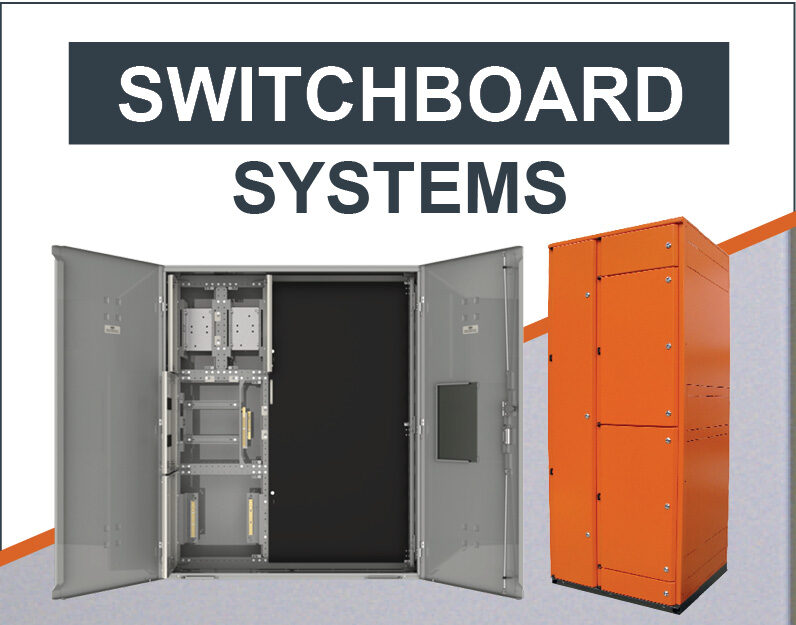
Switchboard building system for systems up to 630A suitable for applications requiring an IP34 installation.
-
Switchboard building system for systems up to 630A suitable for applications requiring an IP2X installation.
-
Switchboard building system for systems up to 630A suitable for applications requiring an IP66 installation.
-
A pre-wired switchboard for multi-residential and commercial applications.
-
A pre-wired switchboard for multi-residential and commercial applications.
-
A pre-wired switchboard for multi-residential and commercial applications.
-
A pre-wired switchboard for multi-residential and commercial applications.
-
Designed specifically for outdoor environments, the IP Switchboard is an extension of B&R’s tried and trusted Monarch IP range.
-
The Lambert LB is a 316 stainless steel, sun shaded enclosure designed for applications where the enclosure has a high risk of heating up due to excessive solar radiation.
-
A range of metal enclosures for general purpose metering requirements, suitable for use in internal and switchroom applications.
-
The Miner ME is designed to be used in underground for 1000 Volt applications. It's made from 2mm thick steel with polyester paint to provide superior protection and visibility.
-
Monarch IP from B&R is an IP66, 316 stainless steel general purpose enclosure and switchboard building system with a huge range of accessories.
-
Monarch IP from B&R is an IP66, aluminium general purpose enclosure and switchboard building system with a huge range of accessories.
-
Monarch IP from B&R is an IP66, aluminium general purpose enclosure and switchboard building system with a huge range of accessories.
-
Monarch IP from B&R is an IP66, 316 stainless steel general purpose enclosure and switchboard building system with a huge range of accessories.
-
Monarch IP from B&R is an IP66, steel general purpose enclosure and switchboard building system with a huge range of accessories.
-
Monarch IP from B&R is an IP66, steel general purpose enclosure and switchboard building system with a huge range of accessories.
-
An IP66, small main board (up to 630A) developed as a solution to local electricity and distribution requirements in remote metering application or emergency power restorations.
-
An IP23 metering enclosure suitable for domestic and light commercial metering installations.
-
An IP23, entry level range of enclosures suitable for domestic and light commercial installation.
-
Raiser brackets are designed to be used as a point of attachment for above ground service mains to the premises.
-
The NOX series is a range of wall or door mounted air conditioners suitable for indoor or outdoor applications.
-
onyX Floor is a light duty network cabinet designed for standalone installations in offices and data cupboards. It includes most of the accessories typically required for an installation.
-
A range of floor standing cabinets for small networking applications with mesh doors and 10-way Australian 3-Pin power rail.
-
A 19" wall mount cabinet that is easy-to-install and provides maximum accessibility for maintenance.
-
A versatile and reliable IP33 distribution board system designed for general-purpose applications
-
IP66 weatherproof, highly robust distribution board system
-
The Pilbara SP is an IP66 enclosure for the mining and mineral processing industries. Developed to withstand the harsh environments of the Pilbara, it features a 30 degree sloping roof.
-
An IP66 enclosure with sunshades designed for the most common mining, mineral processing and infrastructure projects.
-
Robust surface mount plastic DIN rail loadcentre with hinged cover to protect control equipment.
-
The Polynova PC series is a range of IP66 modular thermoplastic, general purpose enclosures. They are available in 19 sizes and have a wide variety of accessories to suit almost any application.
-
The Polynova PD series is a range of IP65 general purpose enclosures with a hinged door, available in 6 sizes. Manufactured from a non-metallic material (GRP) the PD is available with a wide variety of accessories.
-
Polynova PJ from B&R is a range of IP55 modular plastic enclosures or adaptable boxes designed to house terminations and electrical components.
-
Polynova PM is an IP65 modular plastic enclosure which has been designed for use as individual enclosure or to be arranged in combinations to form complete distribution banks.
-
The Polynova PN range is a hinged IP66, plastic enclosure system, with an easy to use latch assembly. It is available in 12 different sizes with opaque and transparent lids.
-
The Polynova PS range, is an IP67 high performance enclosure system that is suitable for indoor and outdoor applications including use in full sunlight. There are 24 different sizes with the choice of opaque or transparent lids.
-
A non-metal, IP66 rated enclosure suitable for harsh environments and low voltage (LV) double insulated applications.
-
Lockable segregation enclosure to prevent contact with live parts.
-
An enclosure solution for intelligent traffic control systems.
-
Raiser brackets are specifically engineered to suit the Service and Installation Rules (SIR) of Australian based Electricity Distributors.
-
An IP23 metering enclosure designed for single and multi-phase installations and suitable for domestic and light metering applications in Queensland.
-
The Australian Made enclosure manufactured to suit the toughest conditions and Australian Rail Operators.
-
Metering Enclosure accessories are designed to suit the Service and Installation Rules (SIR) of Australian based Electricity Distributors and help with metering enclosure installation.
-
The range of roof mounted air conditioners have been designed to cool electrical enclosures to prevent failure of installed equipment. Once installed the enclosure can be rated to IP54.
-
Residential metering accessories for SA enclosures used as a point of attachment for above ground service mains to the premises.
-
A customisable enclosure suitable for use in hazardous areas, chemical, petrochemical, dust and grain applications where a small enclosure is required.
-
A customisable enclosure for use in hazardous areas, chemical, petrochemical, dust and grain applications where a small enclosure is required.
-
B&R's range of IP43/IP55, type-tested, certified, switchboard building system for Low Voltage switchboards and motor control centres (MCC’s).
-
Suitable for use in hazardous areas, chemical, petrochemical, dust and grain applications where a small enclosure is required.
-
The sloping roof electrical box is made from 316SS and is suitable for use in hazardous areas, Zones 1 & 2, 21 & 22.
-
An IP23 enclosure providing a pre-wired solution for multiple tenancy installations in SA.
-
An IP23 enclosure that has the capacity to recess into a brick wall with ease, the rebated series of metering are suitable for domestic and light commercial installations.
-
An IP23 enclosure suitable for domestic and light commercial metering installations.
-
Suitable for voice or data cabling for up to 500 pairs and are available in two configurations to suit with models for indoor and outdoor installations.
-
Accessories for telecommunications cabinets including doors, 48VDC power distribution products, drawers, shelves, mounting and superstructure products and cable management.
-
Designed for installation in telephone exchanges to house standard telecommunications equipment & accessories. These racks are to be secured to a superstructure.
-
A comprehensive range of Uncovered Links varying from 90Amp to 250Amp.
-
Designed to keep server cabinets cool to drastically improve performance and reliability of the equipment
-
The Universal DD is a stainless steel IP55, double door enclosure from B&R. It has no centre mullion making installation and access to equipment easy and convenient.
-
The Universal DD is a steel IP55, double door enclosure from B&R. It has no centre mullion making installation and access to equipment easy and convenient.
-
B&R’s Universal NI range of IP66 general purpose enclosures are often wall mounted using its integrated bolting. It is manufactured from 316 stainless steel with an N4 finish.
-
B&R’s Universal NI range of IP66 general purpose enclosures are often wall mounted using its integrated bolting. It is manufactured from 316 stainless steel with an N4 finish.
-
B&R’s Universal NI range of IP66 general purpose enclosures are often wall mounted using its integrated bolting. It is manufactured from powdercoat painted steel.
-
B&R’s Universal NI range of IP66 general purpose enclosures are often wall mounted using its integrated bolting. It is manufactured from powdercoat painted steel.
-
The Texa DLK range are high capacity fans for industrial enclosures. They help cool equipment by circulating outside air through the enclosure.
-
The Texa FAN range are fans and filters for industrial enclosures. They help cool equipment by circulating outside air through the enclosure.
-
An IP23 enclosure suitable for installations that require the use of CT metering above 100Amp.
-
A range of pre-wired and unwired enclosures to suit multiple tenancy installations in Victoria complying to State Authority Rules and Regulations.
-
An IP23 enclosure, the MD series of metering enclosures are suitable for domestic and light commercial metering installations.
-
A range of raiser brackets and accessories for Victoria metering enclosures.
-
Finding a way to easily and correctly mount electrical enclosures is a common problem. B&R Enclosures supply MEB/S wall mounting brackets.